

Same Day Mac Repairs Balaclava, VIC 3183
Searching for MacBook repairs near me in Balaclava? Our Apple-certified technicians deliver fast, affordable Mac repairs the same day you call — screen cracks, battery failures, liquid damage, and more.
- Fast, same-day Mac repairs to minimise downtime.
- Apple-certified technicians ready for any issue.
- Affordable pricing with a 90-day warranty.
- Local expertise — convenient to Balaclava.
- Genuine Apple-spec parts on every repair.

 15+
15+
Years of Excellence
 1000+
1000+
Customer Satisfaction
 25+
25+
Skilled Repairers
 2500+
2500+
Devices Repaired
Same Day Mac Repairs
Reliable and Professional Mac Repair Service in Balaclava
If your Mac is giving you trouble in Balaclava, look no further. Our dedicated team specialises in fast, effective Mac and MacBook repairs. We know how crucial your device is, so we offer same-day service to ensure you’re never left waiting.
As a locally trusted Apple repair service, we understand the unique needs of Balaclava customers — whether you’re a student, professional, or creative. Just swing by or give us a call; we tailor every repair to your situation.
Our commitment to fast, reliable MacBook repairs sets us apart. You won’t have to stress about long waits or hidden costs when you trust us with your Mac in Balaclava.
- Best Price Guarantee
- Apple Certified Technicians
- Genuine Apple Parts
- One-Hour MacBook Repairs
Free Device Diagnosis and Estimate for Balaclava Customers
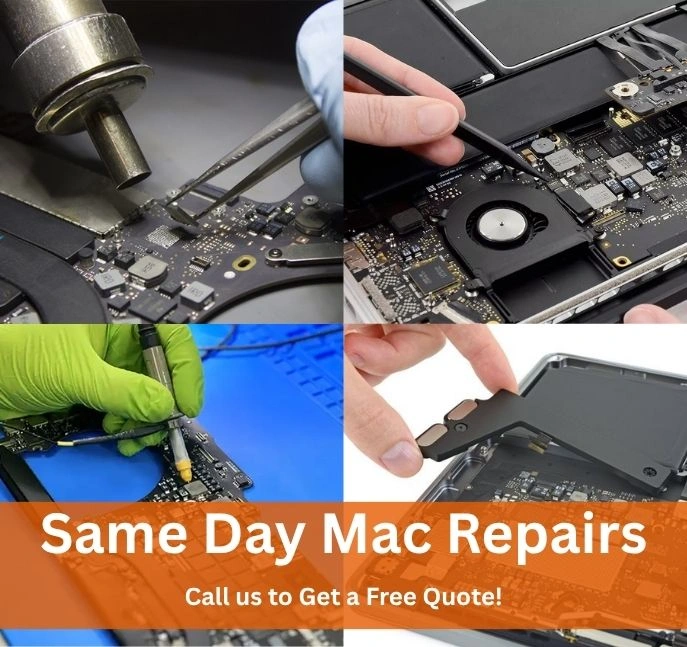
Before any repairs, we provide a free device diagnosis for all Balaclava customers. You’ll know exactly what’s wrong and how much it costs — no hidden fees, just transparent, honest service.
Our Free Device Assessment Process
Bring in Your Device
Drop by our Oakleigh workshop — easily accessible from Balaclava — or request pickup. Walk-ins are welcome; no appointment needed.
Diagnostics and Analysis
Our skilled technicians run a full hardware and software diagnostic to pinpoint every issue accurately — no guesswork, no rushing.
Detailed Quote Provided
We present a full itemised quote before touching your Mac. No obligation to proceed — it’s completely your call.
 Get a Free Quote
Questions about Mac repairs in Balaclava? Give us a
call on 03 9997 8092.
Trusted Mac Repair Experts in Balaclava
From basic battery swaps to complex logic board repairs, our Balaclava team handles every Mac issue fast and affordably.
Basic MacBook Repairs (Basic Level Repairs)
Our Basic MacBook Repairs address the most common issues — completed same day so you’re back up and running from Balaclava without delay.
Advanced MacBook Repairs (Chip-Level Repairs)
For deep hardware faults, our Advanced MacBook Repairs target specific internal components — restoring your Mac’s original performance without a costly replacement.
Chip-Level Logic Board Repair
Graphics Card Repair
Power Circuit Repair
Motherboard Resoldering
Chip Replacements
We Repair All Mac Models in Balaclava
From iMac to MacBook Pro and Mac Mini — our technicians know every model inside out. Bring your Mac in from Balaclava and we’ll fix it right the first time.
- iMac
- Mac Pro
- MacBook
- MacBook Pro
- MacBook Pro Retina
- MacBook Air
- Mac Mini

- iMac (21.5-inch, 2017)
- iMac Pro (2017)
- iMac (27-inch, 2020)
- iMac (24-inch, M1, 2021)
- iMac (27-inch, M1, 2022)

- Mac Pro (2013)
- Mac Pro (2019)
- Mac Pro (2023)
- Mac Pro (M2 Ultra, 2023)
- MacBook (12-inch, 2015)
- MacBook (2017)
- MacBook (2019)
- MacBook (2020)

- MacBook Pro 16" (M3 Pro / Max)
- MacBook Pro 14" (M3)
- MacBook Pro 16" (M2 Pro / Max)
- MacBook Pro 14 / 16" (M1 Pro / Max)
- MacBook Pro 13" (M1, 2020)
- MacBook Pro (Intel, 2012–2020)

- MacBook Pro Retina 15" (2012)
- MacBook Pro Retina 13" (2013)
- MacBook Pro Retina 15" (2015)
- MacBook Pro Retina 13" (2016)
- MacBook Pro Retina 16" (2019)

- MacBook Air (M3, 2024)
- MacBook Air (M2, 2022–2023)
- MacBook Air (M1, 2020)
- MacBook Air (Retina, 2018–2020)
- MacBook Air (2017 & earlier)

- Mac Mini (M2 / M2 Pro, 2023)
- Mac Mini (M1, 2020)
- Mac Mini (2018, Intel)
- Mac Mini (2014)
Emergency Mac Repairs in Balaclava — We’re Available Now
Mac crashed before a deadline? Liquid damage from an accidental spill? Data lost from a failed drive? Same Day Mac Repairs provides urgent, same-day emergency Mac repair in Balaclava — so your crisis becomes a two-hour fix, not a two-week wait.
Liquid Damage
Spill on your Mac? Act fast — we’ll save your board and data.
Won’t Power On
Dead MacBook? We diagnose and restore power same day.
Data Emergency
Accidental deletion or drive failure — we recover your files.
Screen Shattered
Cracked display urgently replaced, often within hours.
Response Time
Under 2 Hours
For most emergency repairs
Call 03 9997 8092 Get Urgent Quote24/7 booking available
Why Balaclava Chooses Same Day Mac Repairs?
When it comes to reliable MacBook repairs near Balaclava, these are the reasons our customers keep coming back.
Same-Day Turnaround
Most MacBook repairs for Balaclava customers are completed same day — often within hours. We know downtime costs you.
Apple-Certified Technicians
Every job is handled by Apple-certified technicians trained on all Mac models — M-chip to vintage Intel machines.
90-Day Repair Warranty
All parts and labour are covered by our 90-day warranty. Same fault reoccurs? We fix it free — no questions asked.
Best Price Guarantee
Show us a written quote and we’ll match it. Transparent pricing with full itemised quotes before any work begins.
Pickup & Delivery
Can’t get to our Oakleigh workshop from Balaclava? We offer pickup and delivery — your Mac repaired at your door.
Genuine Quality Parts
We only use Apple-spec components — no cheap substitutes that fail after a few months and void your warranty.
Our Mac Repair Process in Balaclava
Five simple steps from booking to having a fully working Mac back in your hands — same day.
Book Online or Call
Call 03 9997 8092, fill in our online form, or simply walk in. No appointment needed from Balaclava.
Free Diagnostic
Our technician runs a full hardware and software assessment — completely free, no obligation to proceed.
Upfront Quote
Receive a detailed, itemised quote with zero hidden costs. You approve before we start any repair.
Same-Day Repair
Most MacBook repairs completed within hours. We work fast without cutting corners — genuine parts only.
Collect with Warranty
Your Mac is returned with a 90-day warranty and expert maintenance tips to keep it running longer.
Ongoing Support
We’re here after the repair. Reach out via phone or email any time for follow-up advice or support.
Professional MacBook Repairs Near Balaclava, VIC 3183
If you’ve been searching for Mac repairs near me in Balaclava, Same Day Mac Repairs is Melbourne’s trusted choice. Our Oakleigh workshop is a short drive from Balaclava and is equipped to handle everything from a standard MacBook battery replacement to complex logic board repairs and Mac data recovery.
We know your Mac is central to work, study, and creativity. That’s why our team prioritises same-day MacBook repairs in Balaclava with Apple-certified technicians using genuine-spec parts that last.
MacBook Screen Repairs for Balaclava Residents
A cracked or flickering MacBook screen is one of the most common issues we fix for Balaclava customers. We replace MacBook Pro Retina and MacBook Air displays using premium panels — restoring factory-standard colour accuracy and brightness. Most MacBook screen repairs are completed within a few hours of drop-off.
MacBook Liquid Damage Repair in Balaclava
Liquid damage is time-critical. If you’ve spilled water or coffee on your MacBook in Balaclava, switch it off immediately and contact us. Our MacBook liquid damage repair uses ultrasonic cleaning and component-level diagnosis to save boards and data wherever possible.
Battery & Charging Repairs Near Balaclava
Battery drain and charging failures top the list of reasons Balaclava MacBook owners call us. Whether your MacBook won’t hold charge, shows a swollen battery warning, or the USB-C charging port is faulty, we carry OEM-spec batteries for same-day replacement across all models.
Data Recovery from Balaclava
Lost files or a Mac that won’t start? Our MacBook data recovery and Mac data recovery team retrieves irreplaceable photos, documents, and business files. We also handle iMac data recovery.
iMac Repairs for Balaclava Customers
Our desktop Mac coverage is equally comprehensive. We fix iMac screens, iMac logic boards, perform iMac SSD upgrades, replace iMac keyboards, and carry out full iMac repairs.
MacBook Pro & MacBook Air Repairs Near Balaclava
Whether you own a MacBook Pro or MacBook Air, our technicians have model-specific experience and the correct tools. We service M1, M2, M3, and all Intel-based machines.
iPhone, iPad & Computer Repairs Serving Balaclava
Beyond Mac, we’re also Melbourne’s destination for iPhone repairs, iPad repairs, phone repairs, and computer repairs — one workshop, all your Apple device needs covered.
Mac Repairs Also Serving Suburbs Near Balaclava
Customers from these nearby suburbs use our Oakleigh workshop or our pickup & delivery service regularly.
Get Your Mac Fixed Today in Balaclava
Don’t let a broken MacBook slow you down. Our Balaclava-area technicians are ready — free diagnosis, same-day repair, 90-day warranty.
Book a Free Quote 03 9997 8092
📍 02/52-54 Atherton Road, Oakleigh VIC 3166 | ✉️ info@samedaymacrepairs.au | ⏰ 24/7 Booking
Frequently Asked Questions — Mac Repairs Balaclava
Most common repairs — screen replacements, battery swaps, and charging port fixes — are completed same day, often within a few hours of drop-off. Logic board repairs and data recovery may take 1–2 business days. We always confirm the timeframe upfront.
Book an Expert for MacBook Repairs Today!
Our Latest Blogs

How Do You Set Up Your...
Getting a new MacBook is exciting — but the setup process can feel surprisingly involved if you’ve never done it […]

How to Know If Your MacBook...
Your MacBook’s logic board is its brain — the central circuit board that connects and powers every component. When it […]

MacBook Pro vs MacBook Air: Which...
You’re deciding between a MacBook Pro and MacBook Air, but you’re thinking beyond the purchase price. What happens when something […]

MacBook Chip Replacement Cost Melbourne
If your MacBook has stopped working the way it should — freezing unexpectedly, failing to boot, or showing signs of […]

MacBook Fan Replacement Cost Melbourne
Your MacBook’s fan is easy to ignore — until it isn’t. A fan that’s suddenly loud, constantly running at full […]

How RAM Improve Your MacBook’s Performance?
In the ever-evolving world of technology, your MacBook’s performance is key to ensuring you can work efficiently, whether you’re a […]